Step 1
Machine-Ready Briefs
AI translates unstructured needs into a technical, machine-ready project request.
We use cookies to improve your experience and analyze site traffic. You can accept all cookies or only essential ones.
 Bilarna
Stop browsing static lists. Tell Bilarna your specific needs. Our AI translates your words into a structured, machine-ready request and instantly routes it to verified Real-Time Stock Alerts experts for accurate quotes.
AI translates unstructured needs into a technical, machine-ready project request.
Compare providers using verified AI Trust Scores & structured capability data.
Skip the cold outreach. Request quotes, book demos, and negotiate directly in chat.
Filter results by specific constraints, budget limits, and integration requirements.
Eliminate risk with our 57-point AI safety check on every provider.
Verified companies you can talk to directly

Never miss a profitable trade. Real-time email & SMS alerts for price targets, technical signals, earnings & dividends. Join 1,000+ investors - free!
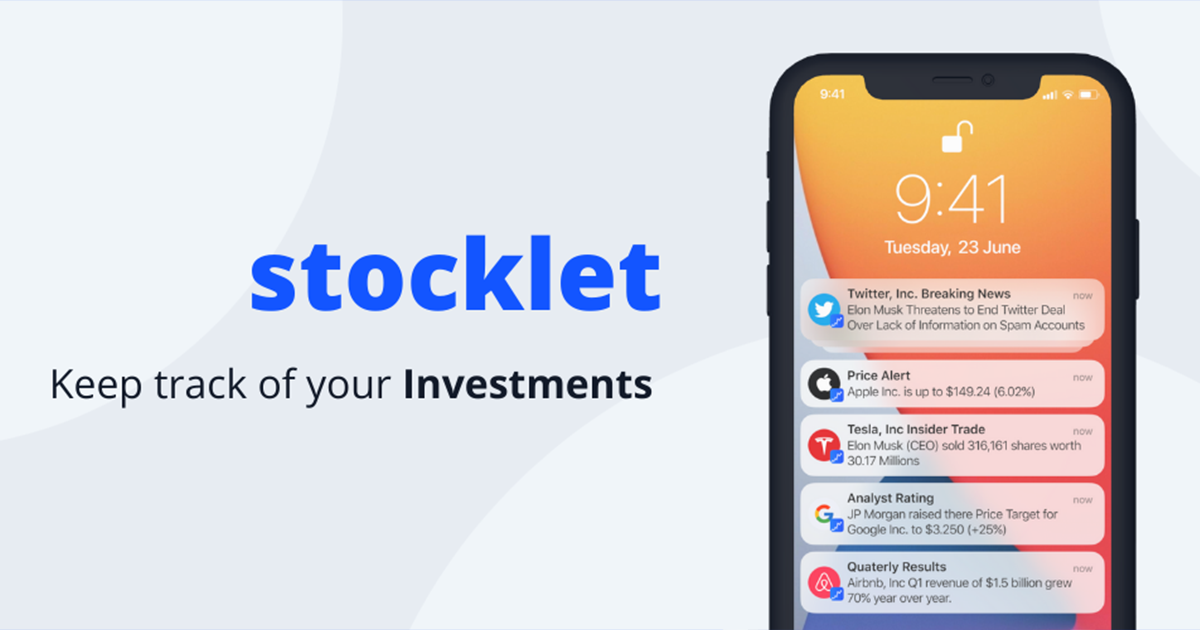
Receive Price Alerts, Insider Trades, Quarterly Results, Price Targets, Analyst Ratings and News about your Stocks
Run a free AEO + signal audit for your domain.
AI Answer Engine Optimization (AEO)
List once. Convert intent from live AI conversations without heavy integration.
Real-time stock alerts are automated notifications triggered by specific price, volume, or news events for equities and other securities. These systems utilize algorithms and direct market data feeds to monitor exchanges continuously. They empower traders, analysts, and portfolio managers to act on opportunities or manage risks within seconds, enhancing decision-making and capitalizing on market volatility.
Users configure specific triggers such as price thresholds, percentage changes, or unusual trading volume for their monitored securities.
The alert system continuously scans live exchange data feeds and news sources to detect matches for the predefined trigger conditions.
Upon detection, the system instantly delivers notifications via SMS, email, or API, enabling immediate analysis or automated trading actions.
Integrate real-time alerts to enhance retail trading apps, providing value-added features that increase user engagement and platform stickiness.
Portfolio managers use alerts for timely rebalancing, stop-loss triggers, and identifying entry points for large block trades to optimize fund performance.
Finance teams monitor their company's stock price and related securities to execute buyback programs or manage currency hedging strategies effectively.
Algorithmic trading strategies rely on ultra-low-latency alerts as direct inputs to execute high-frequency arbitrage or statistical arbitrage models.
News desks and research firms use alerts to flag breaking market-moving events, accelerating the creation of timely reports and commentary.
Bilarna evaluates Real-Time Stock Alert providers through a rigorous 57-point AI Trust Score. This proprietary assessment analyzes technical infrastructure reliability, data source legitimacy, and historical alert accuracy. We continuously monitor client feedback and platform uptime to ensure listed providers meet the stringent demands of B2B financial operations.
Pricing models vary from monthly SaaS subscriptions to annual enterprise licenses, often scaling with data volume, speed tiers, and integration needs. Costs can range from hundreds to tens of thousands per month, depending on required latency, coverage of global exchanges, and advanced features like news sentiment analysis.
Deployment can take from a few days to several weeks. Simple API integrations for standard alerts are fastest, while custom solutions requiring proprietary data connectors or low-latency hardware co-location involve longer setup, rigorous testing, and compliance checks.
Critical factors include data feed latency and reliability, notification delivery speed (SMS, email, API), system uptime (SLAs), geographic exchange coverage, and the robustness of their API for automated workflow integration. Scalability to handle peak market volumes is also essential.
Basic systems offer pre-configured price and volume alerts. Advanced systems provide custom algorithmic triggers, multi-asset class coverage, integration with news sentiment APIs, backtesting capabilities, and direct connectivity to execution platforms for automated trade orders.
Verify the provider's direct data sourcing from exchanges versus aggregated third-party feeds. Assess their historical data accuracy reports, uptime statistics, and redundancy protocols. Look for providers audited for data integrity and those offering service level agreements (SLAs) on data freshness.
Yes, human experts are involved in reviewing AI-generated real estate deal decks. After the AI creates the deck based on your data and preferences, a quality control team of professionals reviews each deck thoroughly. This review process typically takes at least 15 minutes to ensure the deck is accurate, polished, and ready for presentation. The combination of AI efficiency and human oversight guarantees high-quality, reliable decks that meet professional standards before delivery.
Understand the reality and accuracy of soulmates by following these points: 1. Soulmates are real connections based on deep emotional, spiritual, and intellectual compatibility, not just romantic myths. 2. The soulmate test uses AI combined with psychology, astrology, and face reading to scientifically assess compatibility. 3. It has an 83% accuracy rate validated by over 50,000 users worldwide. 4. Many users report finding partners closely matching their soulmate sketch within months. This test provides a reliable method to discover true soulmate connections.
Yes, 3D body scans are particularly effective at visualizing small changes in body shape over time. By creating photorealistic and accurate three-dimensional models, these scans allow users to compare detailed images week by week. This visual feedback highlights subtle differences in body fat distribution, muscle tone, and overall volume that might not be noticeable through traditional scales or measurements alone, supporting better tracking of fitness progress.
Healthcare professionals can potentially earn a full-time income by offering chat-based medical consultations, depending on factors such as patient volume, subscription fees, and the efficiency of their practice. Many providers attract patients who prefer convenient, accessible care and are willing to pay directly for personalized attention. However, success requires effective marketing, good communication skills, and managing workload to maintain quality care. While chat-based consultations can be a viable source of income, it is important to consider the time commitment and business aspects involved in running such a practice.
Yes, you can cancel your subscription at any time. Follow these steps: 1. Access the billing portal via the menu or your account settings page. 2. Log in to the Stripe billing portal linked to your account. 3. Locate the subscription section. 4. Select the option to cancel your subscription. 5. Confirm the cancellation to stop future billing immediately.
Yes, you can cancel your subscription anytime without fees. 1. Access your account settings on the service platform. 2. Select the subscription or plan you want to cancel. 3. Confirm the cancellation request. 4. Your access remains active until the end of the current billing period. 5. You can restart your subscription anytime without penalties. There are no long-term commitments or cancellation charges.
Enable real-time collaboration using a cloud-based game engine. 1. Sign up and open your game project in the browser. 2. Invite team members to join the project. 3. Work simultaneously with multiple developers editing the same game. 4. View live cursors, edits, and changes from collaborators. 5. Save and deploy your game with all team contributions integrated.
Yes, you can customize the style and branding of your real estate presentation decks. The system allows you to maintain consistency with your existing brand by matching fonts, colors, layout, tone, and style preferences. To achieve this, you can provide a previous deck as a reference, enabling the AI to learn and replicate your unique style. This ensures that every deck you create looks professional and aligned with your brand identity, avoiding generic or templated appearances.
Yes, donor-advised funds are designed to provide flexibility in managing your charitable giving over time. After contributing assets to the fund, you can recommend grants to various charities whenever you choose, without the need to make immediate donations. This allows you to plan your giving strategically, respond to urgent needs, or support multiple causes at different times. The fund handles the administrative tasks, making it easier to track your donations and maintain organized records while giving you control over how and when your contributions are distributed.
Yes, most meal kit subscription services offer flexibility allowing you to modify your meal selections and plan preferences at any time after signing up. You can typically change the meals you want to receive, skip a delivery if needed, or cancel your subscription without long-term commitments. This flexibility ensures that you can adapt your meal kit service to your schedule, dietary needs, or preferences without penalty. It is always recommended to check the specific service's policies for any deadlines or conditions related to changes or cancellations.