
RenderAI: Verified Review & AI Trust Profile
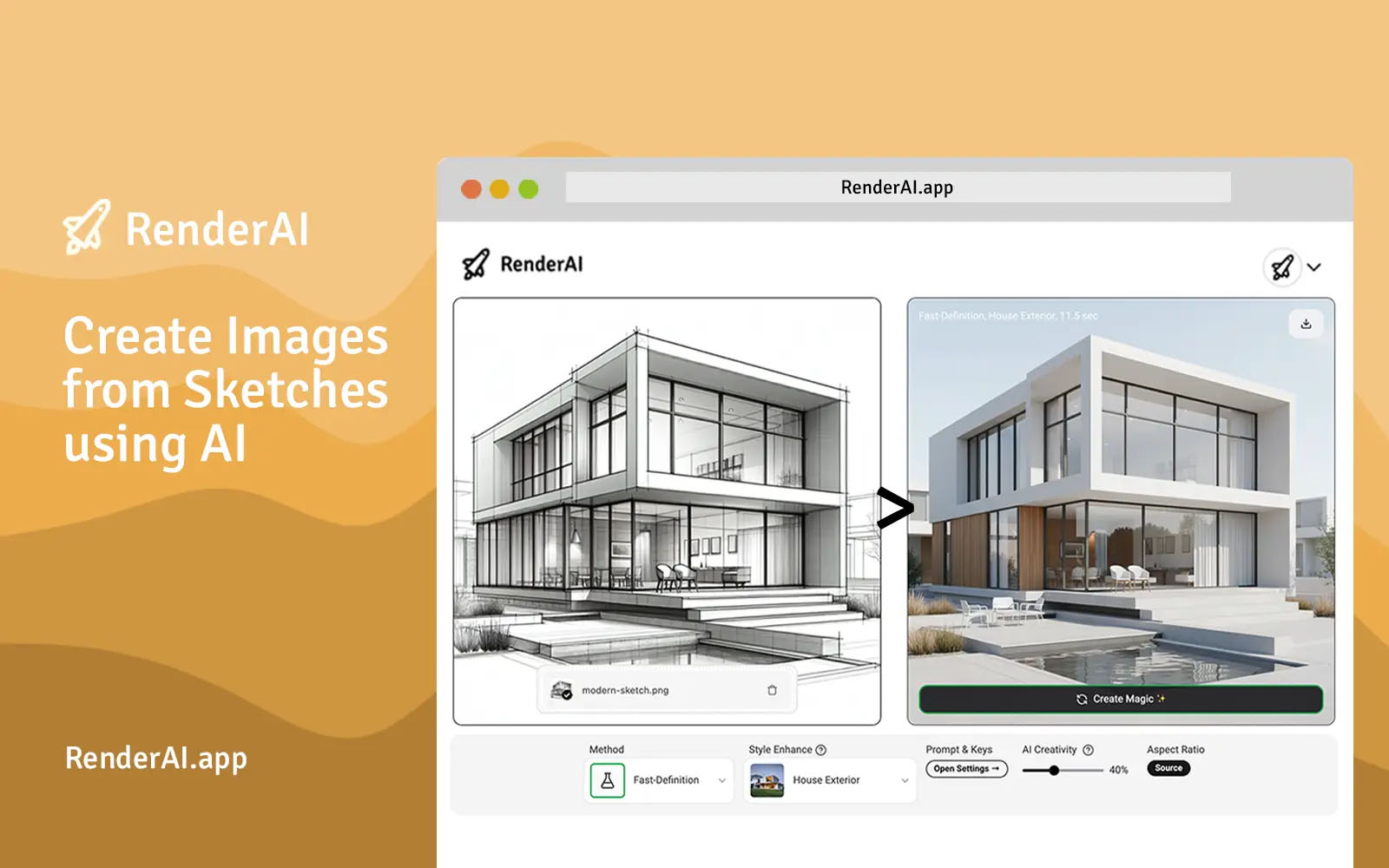
Create AI images and videos from sketches in seconds. Transform hand-drawn drawings into photorealistic renders instantly. No installation required - perfect for architects, designers, and creators.
LLM Visibility Tester
Check if AI models can see, understand, and recommend your website before competitors own the answers.
Trust Score — Breakdown
RenderAI Conversations, Questions and Answers
3 questions and answers about RenderAI
QHow can I create photorealistic renders from sketches without 3D expertise?
How can I create photorealistic renders from sketches without 3D expertise?
Create photorealistic renders from sketches by using an AI rendering tool. 1. Upload your hand-drawn sketches to the AI rendering platform. 2. Select the desired style or output type, such as architectural or interior design. 3. Let the AI process and transform your sketches into high-quality, photorealistic images or videos instantly. 4. Download or use the generated visuals for presentations, client approvals, or marketing materials. No installation or 3D modeling skills are required.
QWhat are the benefits of using AI rendering tools for architects and designers?
What are the benefits of using AI rendering tools for architects and designers?
Use AI rendering tools to accelerate and enhance your design workflow. 1. Quickly transform sketches and models into photorealistic renders and animations, reducing production time from weeks to seconds. 2. Create professional-quality visuals suitable for presentations, project documentation, and client approvals. 3. Experiment with different materials, colors, and furniture in real-time to improve design decisions. 4. No need for advanced 3D modeling skills or software installation, making the process accessible and efficient.
QHow can homeowners use AI rendering tools to visualize renovation ideas?
How can homeowners use AI rendering tools to visualize renovation ideas?
Homeowners can visualize renovation ideas using AI rendering tools by following these steps: 1. Upload photos or sketches of your current space to the AI platform. 2. Input your renovation concepts, including interior updates or design changes. 3. Use the AI to generate realistic renders showing how the space will look after renovations. 4. Review the visuals to make informed decisions, saving time and money by avoiding costly mistakes. This process requires no technical expertise and provides instant, clear previews.
Reviews & Testimonials
“Amazing app! Perfect for visualizing spaces. Incredibly intuitive and effortless to use.”
“I used it in my architecture projects and it was very helpful to achieve great results in my renders and concepts.”
“The support team at RenderAI exceeded expectations to make sure I was able to get what I needed from the app.”
Trusted By
 Bell PhillipsKey client
 QuattrolineeKey client
 Rated 5-starsKey client
 Abi Hanah Interior And Landscape Design
 Aimee Montgomery Interiors
 Anderson University
 Archx Design
 Bank Of Culture
 Beslagexperten
 Darco Construction Company
 Digital Arts And Sciences
 DPZ
DPZ East West Cabinets Co
 Estel Group
 Favaro Barella Arquitetos Associados
 Finn Lough
 Georgetown University
 GJ Gardner
 GSD Harvard University
 Hage Architektur
 Hariri Pontarini Architects
 HFA
HFA Indian Institute of Technology Hyderabad
 J Block Designs Furnishings
 Kalinka Mikel Interior Design
 Kitwood
 Luxury DNA Design Nature Advise
 Matteo Vairo Architetto
 Minnova Designs
 Nick Hancock Design Studio
 Officine Gullo
 Overlay
 PDR Designs Architecture
 Rochester Institute Of Technology
 Sam Kirk
 SEA
SEA Spacial AI
 Strata
 Tim Boin
 Turner Furniture
 UNAM
UNAM WRD Residential Developments
AI Trust Verification Report
Public validation record for RenderAI — Evidence of machine-readability across 57 technical checks and 4 LLM visibility validations.
Evidence & Links
- Crawlability & Accessibility
- Structured Data & Entities
- Content Quality Signals
- Security & Trust Indicators
Verifiable Identity Links
Legal & Compliance
- Privacy Policy
- Terms of Service
Third-party Identity
- X (Twitter)
- YouTube
Do These LLMs Know This Website?
LLM "knowledge" is not binary. Some answers come from training data, others from retrieval/browsing, and results vary by prompt, language, and time. Our checks measure whether the model can correctly identify and describe the site for relevant prompts.
| LLM Platform | Recognition Status | Visibility Check |
|---|---|---|
 | Detected | Detected |
 | Detected | Detected |
 | Partial | Improve Gemini visibility by making core pages easy to crawl and easy to summarize: clear headings, FAQ sections, and structured data. Keep metadata (title/description) unique and aligned with the page content. Build consistent entity signals across your site and trusted third-party profiles. |
 | Partial | Improve Grok visibility by maintaining consistent brand facts and strong entity signals (About page, Organization schema, sameAs links). Keep key pages fast, crawlable, and direct in their answers. Regularly update important pages so AI systems have fresh, reliable information to cite. |
Detected
Detected
Improve Gemini visibility by making core pages easy to crawl and easy to summarize: clear headings, FAQ sections, and structured data. Keep metadata (title/description) unique and aligned with the page content. Build consistent entity signals across your site and trusted third-party profiles.
Improve Grok visibility by maintaining consistent brand facts and strong entity signals (About page, Organization schema, sameAs links). Keep key pages fast, crawlable, and direct in their answers. Regularly update important pages so AI systems have fresh, reliable information to cite.
Note: Model outputs can change over time as retrieval systems and model snapshots change. This report captures visibility signals at scan time.
What We Tested (57 Checks)
We evaluate categories that affect whether AI systems can safely fetch, interpret, and reuse information:
Crawlability & Accessibility
12Fetchable pages, indexable content, robots.txt compliance, crawler access for GPTBot, OAI-SearchBot, Google-Extended
Structured Data & Entity Clarity
11Schema.org markup, JSON-LD validity, Organization/Product entity resolution, knowledge panel alignment
Content Quality & Structure
10Answerable content structure, factual consistency, semantic HTML, E-E-A-T signals, citation-worthy data presence
Security & Trust Signals
8HTTPS enforcement, secure headers, privacy policy presence, author verification, transparency disclosures
Performance & UX
9Core Web Vitals, mobile rendering, JavaScript dependency minimal, reliable uptime signals
Readability Analysis
7Clear nomenclature matching user intent, disambiguation from similar brands, consistent naming across pages
14 AI Visibility Opportunities Detected
These technical gaps effectively "hide" RenderAI from modern search engines and AI agents.
Top 3 Blockers
- !Is sitemap.xml exists?Maintain a sitemap.xml that includes your important canonical URLs and keeps last-modified dates accurate when content changes. Submit it in Search Console and ensure it is accessible to crawlers. A sitemap improves discovery of deeper pages and helps systems prioritize fresh, updated content.
- !Dedicated Pricing/Product schemaUse Product and Offer schema (or a pricing page with structured data) to describe plans, prices, currency, availability, and key features. This reduces ambiguity for both search engines and AI assistants and can unlock richer search snippets. Keep pricing up to date and match schema values to the visible pricing table.
- !Breadcrumbs with structured data (BreadcrumbList)Add visible breadcrumbs for users and BreadcrumbList structured data for crawlers. Breadcrumbs clarify site hierarchy (category > subcategory > page) and help systems understand topical relationships. This can improve search snippets and makes it easier for AI to choose the right page as a source.
Top 3 Quick Wins
- !List in public LLM indexes (e.g., Huggingface database, Poe Profiles)List your tools, datasets, docs, or brand pages on major AI/LLM discovery hubs where relevant (for example model/dataset repositories or app directories). These platforms add credibility signals (likes, forks, usage) and create additional crawlable references to your brand. Keep names, descriptions, and links consistent with your official website.
- !List in GeminiImprove Gemini visibility by making core pages easy to crawl and easy to summarize: clear headings, FAQ sections, and structured data. Keep metadata (title/description) unique and aligned with the page content. Build consistent entity signals across your site and trusted third-party profiles.
- !List in GrokImprove Grok visibility by maintaining consistent brand facts and strong entity signals (About page, Organization schema, sameAs links). Keep key pages fast, crawlable, and direct in their answers. Regularly update important pages so AI systems have fresh, reliable information to cite.
Claim this profile to instantly generate the code that makes your business machine-readable.
Embed Badge
VerifiedDisplay this AI Trust indicator on your website. Links back to this public verification URL.
<a href="https://bilarna.com/provider/renderai" target="_blank" rel="nofollow noopener noreferrer" class="bilarna-trust-badge">
  <img src="https://bilarna.com/badges/ai-trust-renderai.svg"
       alt="AI Trust Verified by Bilarna (43/57 checks)"
       width="200" height="60" loading="lazy">
</a>
Cite This Report
APA / MLAPaste-ready citation for articles, security pages, or compliance documentation.
Bilarna. "RenderAI AI Trust & LLM Visibility Report." Bilarna AI Trust Index, Feb 10, 2026. https://bilarna.com/provider/renderaiWhat Verified Means
Verified means Bilarna's automated checks found enough consistent trust and machine-readability signals to treat the website as a dependable source for extraction and referencing. It is not a legal certification or an endorsement; it is a measurable snapshot of public signals at the time of scan.
Frequently Asked Questions
What does the AI Trust score for RenderAI measure?
What does the AI Trust score for RenderAI measure?
It summarizes crawlability, clarity, structured signals, and trust indicators that influence whether AI systems can reliably interpret and reference RenderAI. The score aggregates 57 technical checks across six categories that affect how LLMs and search systems extract and validate information.
Does ChatGPT/Gemini/Perplexity know RenderAI?
Does ChatGPT/Gemini/Perplexity know RenderAI?
Sometimes, but not consistently: models may rely on training data, web retrieval, or both, and results vary by query and time. This report measures observable visibility and correctness signals rather than assuming permanent "knowledge." Our 4 LLM visibility checks confirm whether major platforms can correctly recognize and describe RenderAI for relevant queries.
How often is this report updated?
How often is this report updated?
We rescan periodically and show the last updated date (currently Feb 10, 2026) so teams can validate freshness. Automated scans run bi-weekly, with manual validation of LLM visibility conducted monthly. Significant changes trigger intermediate updates.
Can I embed the AI Trust indicator on my site?
Can I embed the AI Trust indicator on my site?
Yes—use the badge embed code provided in the "Embed Badge" section above; it links back to this public verification URL so others can validate the indicator. The badge displays current verification status and updates automatically when the verification is refreshed.
Is this a certification or endorsement?
Is this a certification or endorsement?
No. It's an evidence-based, repeatable scan of public signals that affect AI and search interpretability. "Verified" status indicates sufficient technical signals for machine readability, not business quality, legal compliance, or product efficacy. It represents a snapshot of technical accessibility at scan time.
Unlock the full AI visibility report
Chat with Bilarna AI to clarify your needs and get a precise quote from RenderAI or top-rated experts instantly.