Step 1
Machine-Ready Briefs
AI translates unstructured needs into a technical, machine-ready project request.
We use cookies to improve your experience and analyze site traffic. You can accept all cookies or only essential ones.
 Bilarna
Stop browsing static lists. Tell Bilarna your specific needs. Our AI translates your words into a structured, machine-ready request and instantly routes it to verified Code Explanation Services experts for accurate quotes.
AI translates unstructured needs into a technical, machine-ready project request.
Compare providers using verified AI Trust Scores & structured capability data.
Skip the cold outreach. Request quotes, book demos, and negotiate directly in chat.
Filter results by specific constraints, budget limits, and integration requirements.
Eliminate risk with our 57-point AI safety check on every provider.
Verified companies you can talk to directly
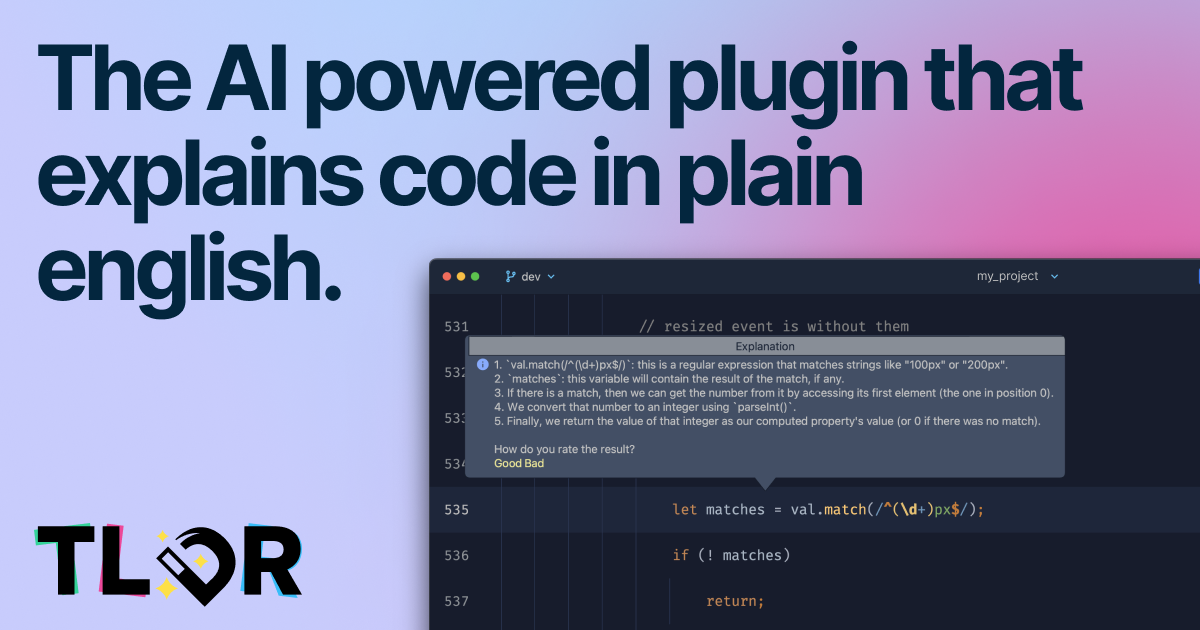
TLDR is an IDE plugin that leverages AI to explain code in plain english. Use it to quickly build the mental context of methods that you dont understand instantly.
Run a free AEO + signal audit for your domain.
AI Answer Engine Optimization (AEO)
List once. Convert intent from live AI conversations without heavy integration.
Code explanation services are professional offerings where software experts analyze, annotate, and document source code to make it understandable. Specialists use techniques like inline commentary, architectural diagrams, and dependency mapping to deconstruct complex logic. This process accelerates onboarding, reduces technical debt, and ensures knowledge continuity for development teams.
You provide the target source code, along with specific areas of confusion or key modules that require detailed analysis and documentation.
A qualified specialist reviews the code, creating comprehensive explanations, flowcharts, and comments that translate technical logic into clear insights.
You receive the final deliverables, typically including annotated code and supplementary guides, ready for immediate use by your development team.
Decipher outdated or poorly documented systems to facilitate safe refactoring, migration, or integration with new technology platforms.
Analyze the code quality and architecture of a target software company to assess technical risks and liabilities before acquisition.
Provide new team members with clear, expert-vetted explanations of complex codebases to drastically reduce their ramp-up time.
Generate precise documentation for regulated industries like FinTech or HealthTech to demonstrate code integrity for auditors.
Understand intricate open-source project code to effectively contribute patches, features, or maintain internal forks.
Bilarna evaluates every provider through a proprietary 57-point AI Trust Score, assessing technical expertise via portfolio review and live coding challenges. We also verify client satisfaction scores, on-time delivery history, and compliance with security and data handling standards. This continuous monitoring ensures you only connect with reliable, high-quality code explanation specialists.
Costs vary by project scope, codebase complexity, and required detail, typically ranging from $2,000 to $15,000+. Pricing models include fixed-price per module or hourly rates from $80 to $200, depending on the expert's seniority and the technology stack.
A project can take from a few days for a single module to several weeks for an entire enterprise system. Timeline depends on codebase size, documentation depth, and the availability of original developers for contextual questions.
Standard documentation outlines 'what' the code does, while expert explanation services dive into the 'why'—clarifying business logic, architectural decisions, and complex algorithms. It provides context and rationale that raw comments often lack.
Prioritize providers with proven expertise in your specific tech stack and application domain. Review their sample explanations, check references for similar projects, and ensure their deliverables match your needs, such as diagrams or integration with your wiki.
Key deliverables include annotated source code with detailed comments, high-level and sequence diagrams, a summary report of key findings and potential issues, and often a walkthrough session with your team to transfer knowledge effectively.
Many health insurance plans now cover doula services, recognizing their value in supporting maternal health. Coverage can vary depending on the insurer and the specific plan, but it often includes prenatal visits, labor and delivery support, and postpartum care provided by certified doulas. Insurance coverage helps reduce out-of-pocket costs for families seeking holistic birth and postpartum support. It is advisable to check with your insurance provider to understand the extent of coverage and any requirements such as certification or referral needed to qualify for benefits.
Yes, some online healthcare booking platforms offer benefits such as cashback when you book your medical appointments or procedures through them. Cashback offers can help reduce the overall cost of your healthcare expenses. These incentives encourage patients to use the platform for their healthcare needs, providing both convenience and financial savings.
No, there are no hidden fees for storage and last-mile delivery services. 1. The company uses a transparent pricing model. 2. Fees for these essential services are limited to what logistics partners charge. 3. No additional charges are added on top of partner fees. 4. Always verify pricing details by contacting the company directly to avoid surprises.
Typically, reputable early wage access and bill pay services do not charge hidden or late fees. They usually apply a small, transparent fee for accessing your wages early or splitting bills, which is clearly communicated upfront. Repayments are aligned with your payday to help you manage your finances without incurring additional penalties. However, it is important to review the terms and conditions of each service to understand any potential fees or charges before using them.
Yes, some skincare services partner with dermatology providers to offer exclusive discounts on consultations. These discounts can make professional skin health advice more accessible and affordable. Typically, such offers are available through apps or platforms that connect users with certified dermatologists. For example, a skincare app might provide a special percentage off the cost of dermatology consultations in certain regions. These promotions encourage users to seek expert care for their skin concerns while benefiting from reduced fees. It's advisable to check the specific terms and availability of discounts within the skincare service or app you are using.
Yes, modern QR code ordering systems are designed to integrate seamlessly with existing POS (Point of Sale) and payment systems. This integration allows orders placed via QR codes to be automatically entered into the restaurant’s POS, ensuring accurate and efficient order management. It also supports various payment gateways, enabling guests to pay online securely and conveniently. Integration helps staff manage orders without changing their usual workflow and supports features like real-time stock updates, upselling prompts, and bill payment options, enhancing overall operational efficiency.
AI code review platforms can significantly enhance team collaboration and code quality. By providing automated, objective feedback on code changes, these platforms reduce misunderstandings and subjective opinions during reviews. They help establish and enforce coding standards consistently across the team, ensuring everyone follows best practices. The faster identification of bugs and issues allows teams to address problems promptly, reducing technical debt. Moreover, AI tools facilitate knowledge sharing by highlighting code patterns and potential improvements, fostering a culture of continuous learning and collaboration among developers.
Yes, AI code review tools typically integrate seamlessly with popular version control platforms such as GitHub and GitLab. This integration allows automatic review of pull requests within the existing development workflow. Many tools support a wide range of programming languages including Python, JavaScript, TypeScript, Go, Java, C, C++, C#, Swift, PHP, Rust, and others. While support for some languages may vary in response quality, these tools aim to provide comprehensive analysis across diverse codebases, helping teams maintain code quality regardless of their technology stack.
Yes, an integrated digital marketing agency typically offers flexible service models, allowing you to select specific services to match your project goals and budget. You are not required to purchase a full package. You can tailor your engagement to include only the services you need, such as SEO management, PPC advertising, social media marketing, branding, graphic design, web development, or video production. This a la carte approach ensures you pay only for the expertise required to achieve your objectives. The agency will create a custom proposal based on your defined scope, providing a cost-effective and targeted solution.
Yes, many automated code review tools offer features that help developers generate tested and reliable code snippets. These tools use advanced algorithms to produce code that adheres to best practices and passes common test cases. By providing ready-to-use, tested code, they reduce the time developers spend writing and debugging code manually. This assistance not only speeds up development but also improves overall code quality and reduces the likelihood of introducing new bugs.