Step 1
Machine-Ready Briefs
AI translates unstructured needs into a technical, machine-ready project request.
We use cookies to improve your experience and analyze site traffic. You can accept all cookies or only essential ones.
 Bilarna
Stop browsing static lists. Tell Bilarna your specific needs. Our AI translates your words into a structured, machine-ready request and instantly routes it to verified Photorealistic Rendering Services experts for accurate quotes.
AI translates unstructured needs into a technical, machine-ready project request.
Compare providers using verified AI Trust Scores & structured capability data.
Skip the cold outreach. Request quotes, book demos, and negotiate directly in chat.
Filter results by specific constraints, budget limits, and integration requirements.
Eliminate risk with our 57-point AI safety check on every provider.
Verified companies you can talk to directly
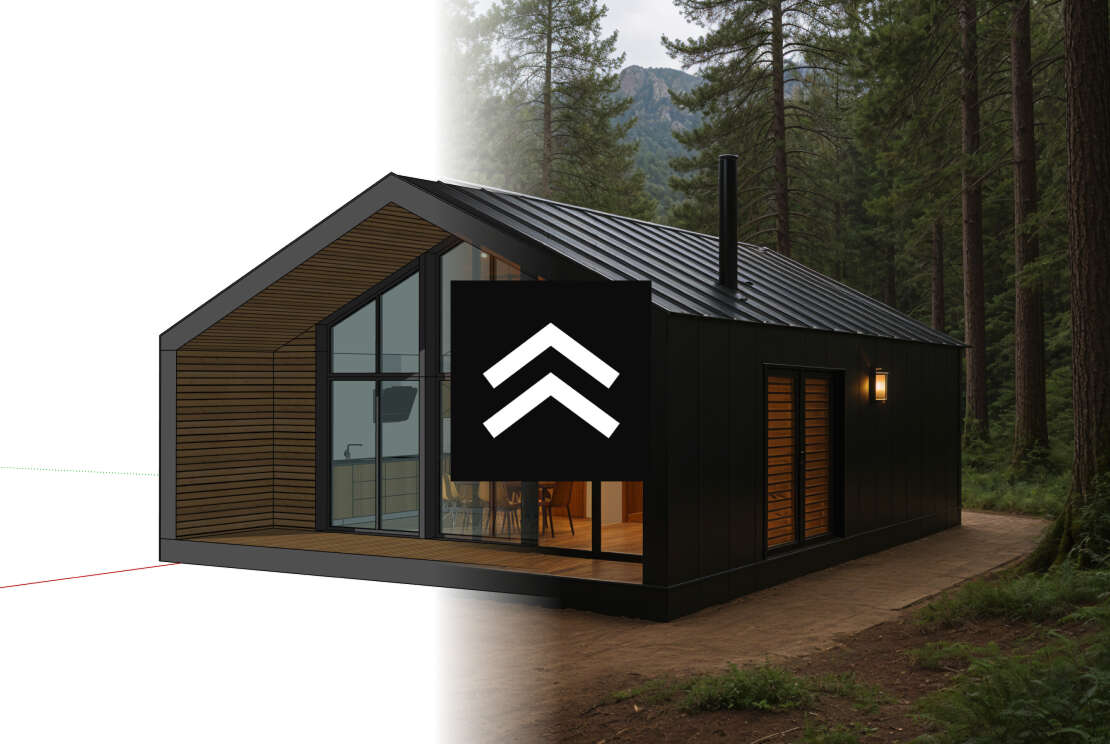
Transform your architectural drawings into stunning photorealistic renders using AI. Professional-quality architectural visualization made simple and fast.
Run a free AEO + signal audit for your domain.
AI Answer Engine Optimization (AEO)
List once. Convert intent from live AI conversations without heavy integration.
Photorealistic rendering is the digital process of generating imagery with a degree of realism that mimics high-quality photography. It leverages advanced 3D modeling, accurate lighting simulation, and detailed material textures to produce lifelike visualizations. This capability enables businesses to present products, architecture, and concepts with exceptional clarity before physical production, reducing costs and accelerating approvals.
A detailed 3D digital model of the object or environment is created, specifying precise geometry, materials, and surface properties.
Virtual lighting is set up to simulate natural or artificial light, while cameras are positioned to establish the final composition and perspective.
A rendering engine calculates light interaction across millions of pixels, after which the final image is refined for color, contrast, and detail.
Architects and developers use photorealistic renders to present unbuilt properties, allowing for stakeholder buy-in and marketing of future spaces.
Manufacturers create compelling visuals of products for e-commerce, catalogs, and ads, eliminating the need for costly prototype photoshoots.
The industry relies on ultra-realistic renders for design reviews, marketing launches, and engineering presentations of vehicles and components.
Designers visualize furniture layouts, material selections, and lighting schemes for clients to experience a space before implementation.
Studios create high-fidelity concept art and pre-visualization shots to plan scenes, sets, and visual effects with great accuracy.
Bilarna evaluates every photorealistic rendering provider through a proprietary 57-point AI Trust Score. This score rigorously assesses technical expertise via portfolio analysis, verifies client satisfaction through reference checks, and monitors delivery reliability. Bilarna's platform ensures you only compare providers who meet stringent standards for quality and professional integrity.
Costs vary significantly based on image complexity, resolution, and required revisions, typically ranging from a few hundred to several thousand dollars per image. Factors like custom 3D modeling, animation, and urgent timelines directly influence the final price. Obtaining detailed quotes for your specific project scope is essential for accurate budgeting.
Offline rendering, used for final visuals, employs complex algorithms over hours to achieve maximum realism and detail. Real-time rendering, used in interactive applications, prioritizes speed by approximating lighting effects. The choice depends on whether you need a final marketing image or an interactive visualization.
A standard, high-quality still image can take from a few hours to several days to complete, depending on its complexity. The timeline includes 3D modeling, scene setup, the actual render computation, and post-production editing. Projects requiring multiple views or animations will naturally have a longer timeline.
Industry-standard software includes V-Ray, Corona Renderer, Arnold, and Redshift for rendering, paired with 3D applications like 3ds Max, Cinema 4D, or Blender. The best tool depends on the specific workflow, required integrations, and the artist's expertise with the software's capabilities.
Provide detailed CAD/3D models, reference photos, material samples, and a clear creative brief outlining the desired mood, lighting, and camera angles. Comprehensive feedback on initial drafts is crucial for aligning the final render with your vision and minimizing revision cycles.
Developers can integrate GPU-accelerated HTML rendering by following these steps: 1. Choose the appropriate renderer: GPU for maximum performance or CPU for easier integration. 2. Use the GPUDriver API to render accelerated content directly within the existing rendering pipeline. 3. Implement transparent rendering to composite web content over game visuals. 4. Utilize the ImageSource API to display custom images or textures in web elements. 5. Secure asset loading with the FileSystem API to control local file access and web requests. 6. Follow platform-specific integration guides for Windows, macOS, Linux, consoles, and ARM64 devices.
Homeowners can visualize renovation ideas using AI rendering tools by following these steps: 1. Upload photos or sketches of your current space to the AI platform. 2. Input your renovation concepts, including interior updates or design changes. 3. Use the AI to generate realistic renders showing how the space will look after renovations. 4. Review the visuals to make informed decisions, saving time and money by avoiding costly mistakes. This process requires no technical expertise and provides instant, clear previews.
Convert your hand-drawn product design sketch into a high-quality rendering by following these steps: 1. Upload your pencil sketch or hand-drawn draft to the AI rendering platform. 2. Adjust the rendering parameters such as lighting, texture, and perspective to suit your design needs. 3. Generate multiple render variations to explore different visual styles. 4. Review and select the best renderings to include in your portfolio or presentations. This process leverages generative AI to rapidly transform sketches into professional-grade 3D visualizations.
Create photorealistic 3D renders instantly by using an AI-powered design tool. Follow these steps: 1. Upload or sketch your design concept. 2. Use the tool's AI features to convert the sketch into a full-fidelity 3D render. 3. Adjust form, colors, materials, and lighting as needed. 4. Iterate by making changes and re-rendering quickly. 5. Export or share your photorealistic 3D render.
Create photorealistic 3D renders from SketchUp models using AI by following these steps: 1. Export different scenes of your SketchUp project as 2D images in JPG, PNG, or WebP format. 2. Upload these images to an AI rendering platform. 3. Select rendering configurations such as time of day, lighting, flooring, weather, and environment. 4. Click the Render button to generate the initial photorealistic render. 5. Refine materials, textures, colors, lighting, and styling by typing natural language prompts without needing complex settings or GPU hardware.
Create photorealistic AI images by using an advanced GPT image generation platform. Follow these steps: 1. Choose the AI model that fits your needs, such as GPT-4o Image, DALL-E 3, Flux Pro, or Kling AI. 2. Enter a detailed text prompt describing the image you want to generate. 3. Adjust professional settings like aspect ratio, quality, and output format to refine the image. 4. Use conversational editing to iteratively improve the image by describing changes in natural language. 5. Download your high-resolution photorealistic image in formats like PNG or JPG.
Create photorealistic architectural renders quickly by using an AI rendering platform. 1. Upload your sketches, concepts, or ideas to the platform. 2. Select the desired rendering style or settings. 3. Let the AI process and generate photorealistic images within seconds. 4. Download or share the final renders for your projects. This method eliminates the need for complex 3D software and speeds up the visualization process.
Create photorealistic furniture images quickly by using an AI-powered rendering tool. Follow these steps: 1. Upload a picture of your furniture to the platform. 2. Choose from over 20 unique design styles available. 3. Allow the AI to process and generate photorealistic renders, which typically takes around 15 seconds. 4. Download or use the rendered images as needed for your marketing or sales purposes.
Create photorealistic interior design renders using AI by following these steps: 1. Upload photos, sketches, or SketchUp models of your existing room or design ideas. 2. Choose from a wide range of interior design styles to personalize your project. 3. Use the AI rendering platform to generate stunning, lifelike images of your space. 4. Review and adjust the renders as needed to match your vision. 5. Save or export the images for presentations, marketing, or personal use.
Create photorealistic renders quickly by using an AI-powered rendering service. 1. Upload your architectural drawings to the platform. 2. Choose the desired setting and style for your render, such as daylight or night scene. 3. Start the rendering process, which completes in seconds. 4. Download high-resolution renders ready for presentation. This method eliminates heavy manual prompting and produces professional-quality visualizations fast.