Step 1
Machine-Ready Briefs
AI translates unstructured needs into a technical, machine-ready project request.
We use cookies to improve your experience and analyze site traffic. You can accept all cookies or only essential ones.
 Bilarna
Stop browsing static lists. Tell Bilarna your specific needs. Our AI translates your words into a structured, machine-ready request and instantly routes it to verified AI-Powered Document Search experts for accurate quotes.
AI translates unstructured needs into a technical, machine-ready project request.
Compare providers using verified AI Trust Scores & structured capability data.
Skip the cold outreach. Request quotes, book demos, and negotiate directly in chat.
Filter results by specific constraints, budget limits, and integration requirements.
Eliminate risk with our 57-point AI safety check on every provider.
Verified companies you can talk to directly
We built the best ChatPDF app that allows you to chat with any PDF: upload files, get summaries, extract insights and answers with citations. PDFChat is more adept at handling documents than ChatGPT!
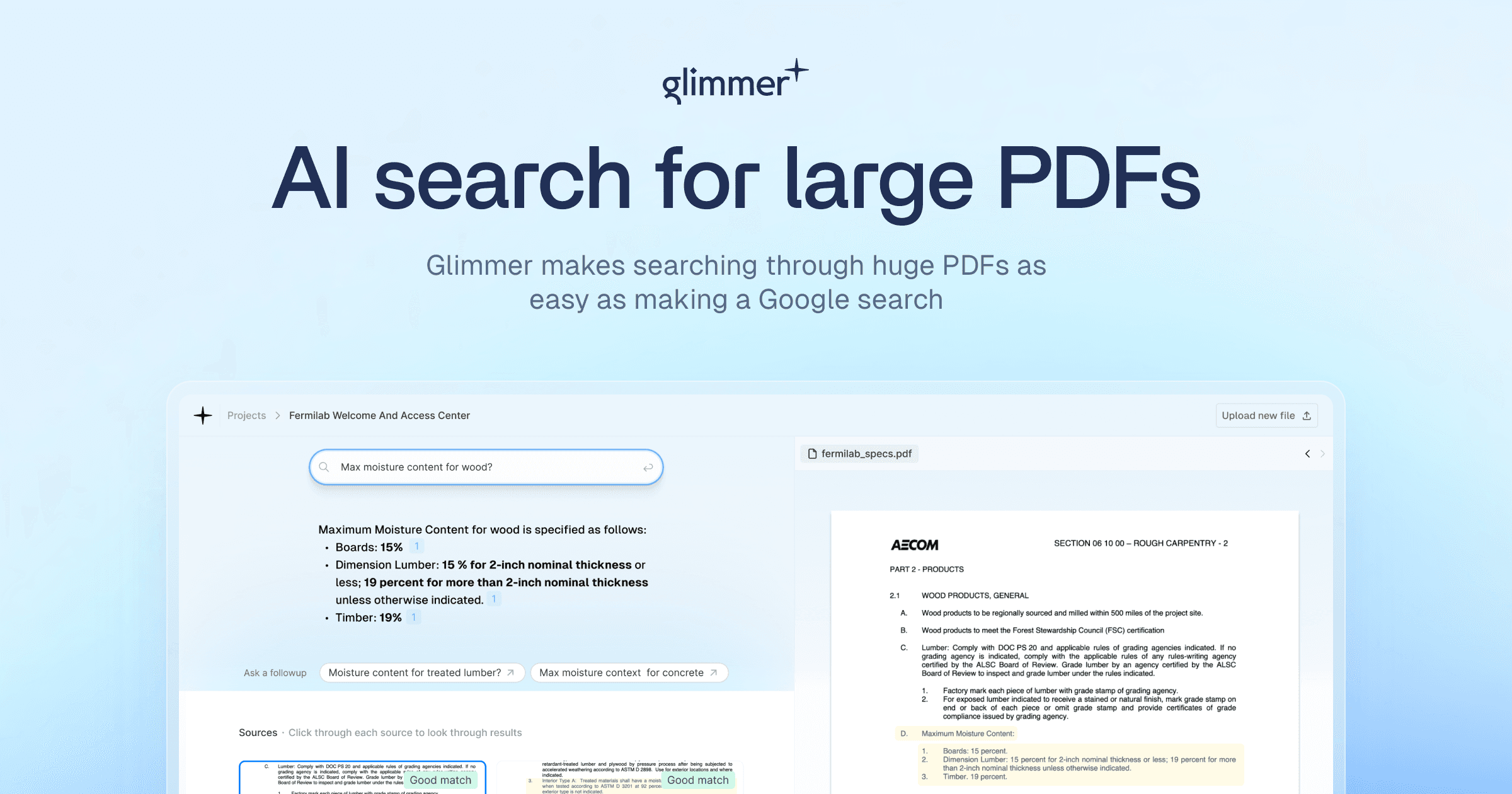
AI Search for Large PDFs
Run a free AEO + signal audit for your domain.
AI Answer Engine Optimization (AEO)
List once. Convert intent from live AI conversations without heavy integration.
AI-powered document search is a category of software that uses natural language processing and machine learning to index, understand, and retrieve information from unstructured documents. It goes beyond keyword matching to comprehend context, intent, and semantic relationships within the content. This technology enables businesses to drastically reduce time spent on manual searches, improve compliance through accurate information retrieval, and unlock insights from vast document repositories.
The system ingests documents from various sources and uses AI models to create a deep, semantic index of the content, not just keywords.
Users ask questions in plain language, and the AI interprets the query's intent to search for conceptually relevant information across the indexed data.
The engine retrieves precise document excerpts or summaries, often citing sources and ranking results by relevance to the user's specific context.
Legal teams use AI document search to rapidly find case law precedents, contract clauses, or regulatory requirements within massive databases, ensuring thorough due diligence.
Banks and fintechs deploy it to analyze transaction records, loan documents, and audit trails for risk assessment, fraud detection, and customer service inquiries.
Researchers and administrators leverage it to sift through clinical trial reports, patient records, and scientific literature to accelerate discoveries and improve care protocols.
Large organizations implement it to give employees instant access to policies, project reports, and technical documentation, breaking down information silos.
Support teams use AI search to instantly find relevant help articles, return policies, or product specifications from internal wikis to resolve customer queries faster.
Bilarna evaluates every AI-powered document search provider against a proprietary 57-point AI Trust Score. This score rigorously assesses technical capabilities, implementation expertise, data security protocols, and verified client satisfaction. Bilarna's continuous monitoring ensures listed providers maintain high standards for reliability and performance.
Costs vary significantly based on deployment scale, features, and vendor. Entry-level SaaS plans can start from a few hundred dollars monthly, while enterprise on-premise implementations with custom AI training can reach six or seven figures annually. Pricing typically correlates with data volume, user count, and required security/compliance levels.
Implementation timelines range from weeks to several months. Cloud-based SaaS solutions with pre-built connectors can be operational in weeks. Complex enterprise deployments requiring custom model tuning, data pipeline integration, and on-premise setup may take 3 to 6 months. The scope of document ingestion and indexing is the primary timeline driver.
Traditional keyword search matches literal words, while AI-powered semantic search understands user intent and contextual meaning. For example, a search for 'financial risk' with AI would also find documents discussing 'credit exposure' or 'default probability' without those exact terms, delivering far more relevant and comprehensive results.
Essential features include robust natural language processing (NLP), connectors for your data sources (e.g., SharePoint, Google Drive, databases), strong data security and access controls, an intuitive query interface, and detailed analytics on search usage. The ability to train or fine-tune models on your specific domain vocabulary is a key differentiator for accuracy.
A frequent mistake is underestimating the importance of data preparation and connector availability. The AI's performance is dependent on clean, accessible data. Choosing a platform without evaluating its compatibility with your existing document repositories and formats can lead to extended integration timelines and suboptimal results.
Yes, the AI-powered teacher tools are free and include the following features: 1. Worksheet Generator to create custom worksheets quickly. 2. Lesson Plan Generator for comprehensive, standards-aligned lesson plans. 3. Report Card Comments generator for professional, personalized feedback. 4. Coloring Page Generator to turn ideas into printable coloring pages. 5. All tools save your work automatically to a cloud library accessible from any device. 6. Tools are private, secure, and supported with fast in-app chat assistance.
There are no limits on the number of searches you can perform once your video is processed. 1. Upload your video content, either as files or via links. 2. The AI processes the video to make it searchable. 3. After processing, you can perform unlimited searches within that video. 4. The only limitation is the total minutes of video you can upload per month based on your account plan.
Yes, many AI-powered browsers built on Chromium technology are compatible with Chrome extensions, allowing users to continue using their favorite add-ons without interruption. These browsers often support seamless import of existing browser data such as bookmarks, passwords, and extensions from Chrome, making the transition smooth and convenient. This compatibility ensures that users do not lose their personalized settings or tools when switching to an AI-enabled browser. By combining AI capabilities with familiar browser features, users can enhance productivity while maintaining their preferred browsing environment.
Yes, an AI-powered authoring platform can handle complex academic content effectively. To do so: 1. Use LaTeX or MathML support to create, edit, and validate complex STEM equations accurately. 2. Integrate with reference databases such as CrossRef, PubMed, and ORCID for real-time reference verification and linking. 3. Apply automatic formatting and style consistency to references and citations. 4. Edit text, tables, and figures with AI assistance to maintain accuracy. 5. Manage author queries and communication within the platform to resolve content issues. 6. Export structured, publication-ready outputs in XML and PDF formats. This ensures precise handling of technical academic content, improving quality and efficiency in scholarly publishing.
Yes, you can use an AI-powered platform alongside your existing email service provider (ESP). 1. Write and design emails using the AI platform. 2. Export or copy-paste the content to your current ESP for sending. 3. Alternatively, manage contacts, sending, and automation directly within the AI platform for a streamlined workflow.
No, you do not need an API key to use an AI-powered WordPress page builder. Follow these steps: 1. Install the AI page builder plugin directly from the WordPress repository. 2. Activate the plugin without any additional setup or API key configuration. 3. Start describing your page requirements and generate content immediately. The AI access is built-in, so there is no need to create external accounts or manage API keys, simplifying the setup process and allowing you to focus on building your site.
No coding or advanced data skills are required to use AI-powered customer reporting tools. Follow these steps to use them effectively: 1. Import or connect your raw data sources to the platform. 2. Let the AI agents automatically analyze and combine your data. 3. Use intuitive interfaces to customize and generate reports. 4. Access embed-ready reports for easy sharing or integration. 5. Make adjustments as needed without writing any code or performing complex data operations.
No coding skills are required to create a web app using an AI-powered builder. These platforms allow you to describe your app idea in plain language, and the AI will automatically build the application for you. This eliminates the need to understand APIs, programming languages, or technical setups. While you can customize the generated code later if you want, the initial creation process is designed to be accessible to users without any coding experience. This approach makes web app development faster and more inclusive for people with diverse skill levels.
No prior influencer marketing experience is needed to use an AI influencer search tool. 1. Simply describe your campaign goals or ideal influencer characteristics. 2. The AI interprets your input as a marketing consultant would. 3. It applies expert knowledge to analyze and match influencers accurately. 4. You receive a curated list of influencers tailored to your needs. 5. This enables anyone, from beginners to experts, to run effective influencer campaigns without specialized skills.
No installation is typically required to use AI-powered video script optimization tools. Follow these steps: 1. Access the tool via a web browser on any device. 2. Sign up or log in to the platform if necessary. 3. Upload or input your video script directly on the website. 4. Use the tool's features online without downloading any software, ensuring quick and easy access.