Step 1
Machine-Ready Briefs
AI translates unstructured needs into a technical, machine-ready project request.
We use cookies to improve your experience and analyze site traffic. You can accept all cookies or only essential ones.
 Bilarna
Stop browsing static lists. Tell Bilarna your specific needs. Our AI translates your words into a structured, machine-ready request and instantly routes it to verified Custom Emoji Generation Services experts for accurate quotes.
AI translates unstructured needs into a technical, machine-ready project request.
Compare providers using verified AI Trust Scores & structured capability data.
Skip the cold outreach. Request quotes, book demos, and negotiate directly in chat.
Filter results by specific constraints, budget limits, and integration requirements.
Eliminate risk with our 57-point AI safety check on every provider.
Verified companies you can talk to directly
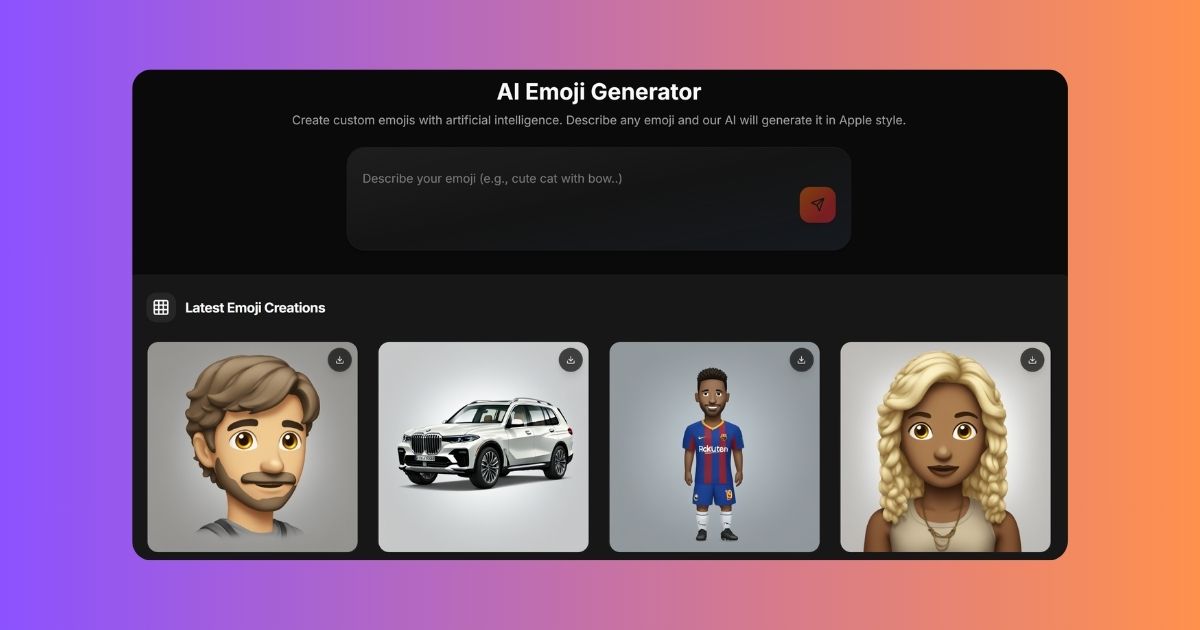
Create unique emoji with AI. Generate cute emojis, funny emoji, angry emoji combos. Free emoji generator with 3 daily tries.
Run a free AEO + signal audit for your domain.
AI Answer Engine Optimization (AEO)
List once. Convert intent from live AI conversations without heavy integration.
Custom emoji generation is the process of designing and creating bespoke emojis, emoticons, or stickers that represent a brand's unique identity, products, or culture. The process leverages graphic design, brand guidelines, and digital illustration to produce cohesive visual assets compatible with major communication platforms. This service enhances digital engagement, strengthens brand recall, and provides teams with personalized tools for internal and external communication.
Establish the creative direction, brand colors, themes, and intended emotional expression for your custom emoji set.
Graphic designers create initial concepts, followed by client feedback rounds to refine details like style, expressions, and coherence.
Approved emoji designs are exported in required file formats and resolutions for deployment across messaging apps and platforms.
Custom emojis foster company culture and streamline internal communication on platforms like Slack, Microsoft Teams, and Workplace by Meta.
Branded emojis and reactions increase engagement, reward superfans, and visually unify conversations on Twitter, Discord, and Twitch.
Custom financial emojis simplify complex transactions, enhance user experience in chat-based banking, and make budgeting features more engaging.
Product or mascot-based emojis are used in customer service chats, loyalty programs, and marketing campaigns to drive brand affinity.
Integrating custom emojis into project management or CRM software improves user interaction, task labeling, and team morale.
Bilarna evaluates every custom emoji generation provider through a proprietary 57-point AI Trust Score. This analysis scrutinizes their design portfolio, client satisfaction history, technical file delivery standards, and adherence to platform-specific compliance. We continuously monitor performance to ensure listed providers maintain high reliability and creative excellence for B2B buyers.
Pricing varies based on set size, complexity, and usage rights, typically ranging from $1,000 to $10,000 for a commercial pack. Costs are influenced by the number of unique emojis, illustration style, required file formats, and whether character design from scratch is needed. Most providers offer tiered packages for small, medium, and enterprise sets.
A standard project takes 3 to 8 weeks from brief to final delivery. The timeline includes initial concepting, client review rounds, revisions, and final asset preparation. Rush delivery is often available for simpler projects, while extensive sets with original characters require more design and iteration time.
You should receive vector source files (like .AI or .SVG) for scalability and raster formats (like .PNG at 32x32, 64x64, 128x128 pixels) for immediate use. Professional providers also deliver platform-specific packages, such as Slack emoji kits or Discord sticker bundles, ensuring correct sizing and specifications.
Custom emojis are unique, brand-owned graphic assets designed to reflect specific products, mascots, or cultural elements. Standard emoticons are universal, platform-provided symbols. The key advantages are brand consistency, exclusive usage rights, and the ability to communicate niche concepts or inside jokes that generic emojis cannot represent.
A professional provider will design according to each platform's technical specifications for size, color profile, and file type. They conduct pre-submission compatibility tests for platforms like Slack, Discord, and GitHub. Always request a platform compliance checklist as part of the service agreement.
Physical orders for custom clothing printing are currently not accepted. You can still use the design app to create and save your clothing designs. The service will notify you when it is ready to accept physical orders. Meanwhile, continue designing and preparing your items digitally until the ordering option becomes available.
Many made-to-order clothing providers include a variety of adjustments at no additional cost when ordering custom-fit men's shirts. These adjustments can involve changes to sleeve length, collar size, torso width, and other fit-related details to ensure the garment fits perfectly. Offering these modifications without extra charges allows customers to achieve a personalized fit without worrying about added expenses. However, it is always advisable to check the specific provider's policy, as some may charge for certain customizations or premium fabric choices.
No, there are no limits on the number of messages or bio generations you can create. To use this unlimited feature, follow these steps: 1. Register and log in to your account. 2. Access the message or bio generation tool within the application. 3. Generate as many messages or bios as needed without restrictions.
Yes, governments often offer grants and financial support programs to subsidize custom software development for businesses. These programs aim to enhance productivity and digital capabilities. Common types include productivity grants that cover a significant percentage of qualifying IT solution costs, including custom software. There are also enterprise development grants focused on upgrading overall business capabilities, where software development is an eligible activity. Furthermore, specific grants exist for startups developing innovative technologies and for projects involving collaboration with research institutions. Eligibility typically depends on company size, project scope, and the innovative potential of the software. The application process can be detailed, so consulting with a qualified grant advisor is recommended to navigate requirements and maximize funding potential.
Yes, many AI animation tools allow users to personalize and edit animations after the initial generation. This capability significantly impacts creative workflows by providing flexibility and control over the final output. Users can start with an AI-generated base animation and then customize elements such as timing, colors, graphics, and text to better align with their brand identity and creative vision. This reduces the need to create animations from scratch while still enabling unique and tailored results. The ability to refine AI-generated content accelerates the creative process, saves time, and allows creators to focus more on innovation and storytelling rather than repetitive technical tasks.
Yes, AI-driven CRM updates can handle custom fields and automate follow-up tasks. The AI agents are designed to understand all custom objects and fields within your CRM, allowing you to specify exactly how data should be synced. Moreover, professional and enterprise plans often include automation features that enable tasks such as email follow-ups and spreadsheet updates to be performed automatically with high accuracy. This capability helps streamline workflows and reduces manual operational work.
Yes, many pediatric behavioral health apps allow parents or caregivers to create custom tasks tailored to their child's specific needs and goals. This flexibility enables you to add a wide range of activities, from daily chores and hygiene routines to educational or therapeutic exercises. Custom tasks help make the app more relevant and engaging for your child, encouraging consistent participation and progress. By personalizing tasks, you can address unique behavioral challenges and reinforce positive habits effectively within the home environment.
Yes, you can edit Roblox UGC items after AI generation. Follow these steps: 1. Generate your Roblox UGC item using the AI tool. 2. Download the item in editable formats such as FBX or GLB. 3. Open the downloaded file in 3D editing software like Blender or Maya. 4. Make any desired adjustments to proportions, details, or design. 5. Save the edited file and upload it to the Roblox UGC Marketplace. Most users find AI-generated items ready to upload, but editing is available for customization.
Yes, you can generate unlimited custom emojis using an AI emoji generator. To try different designs, follow these steps: 1. Enter a detailed description of your emoji idea in the prompt input field. 2. If you want a surprise design, use the 'Random Emoji' button to generate a random style and variation. 3. Review the generated emoji concepts and select your favorite or input a new prompt to create more options. Repeat as many times as you like to explore various designs.
Yes, you can order a custom-made pair of sneakers based on your AI-generated design by following these steps: 1. Use the AI sneaker generator to create and finalize your sneaker design. 2. Save your design and check for any customization options available for ordering. 3. Select the option to order a custom pair if offered by the platform. 4. Provide your size and any additional preferences required. 5. Complete the purchase process with payment and shipping details. 6. Wait for your unique custom sneakers to be manufactured and delivered to you.