Step 1
Machine-Ready Briefs
AI translates unstructured needs into a technical, machine-ready project request.
We use cookies to improve your experience and analyze site traffic. You can accept all cookies or only essential ones.
 Bilarna
Stop browsing static lists. Tell Bilarna your specific needs. Our AI translates your words into a structured, machine-ready request and instantly routes it to verified Audio Editing Services experts for accurate quotes.
AI translates unstructured needs into a technical, machine-ready project request.
Compare providers using verified AI Trust Scores & structured capability data.
Skip the cold outreach. Request quotes, book demos, and negotiate directly in chat.
Filter results by specific constraints, budget limits, and integration requirements.
Eliminate risk with our 57-point AI safety check on every provider.
Verified companies you can talk to directly
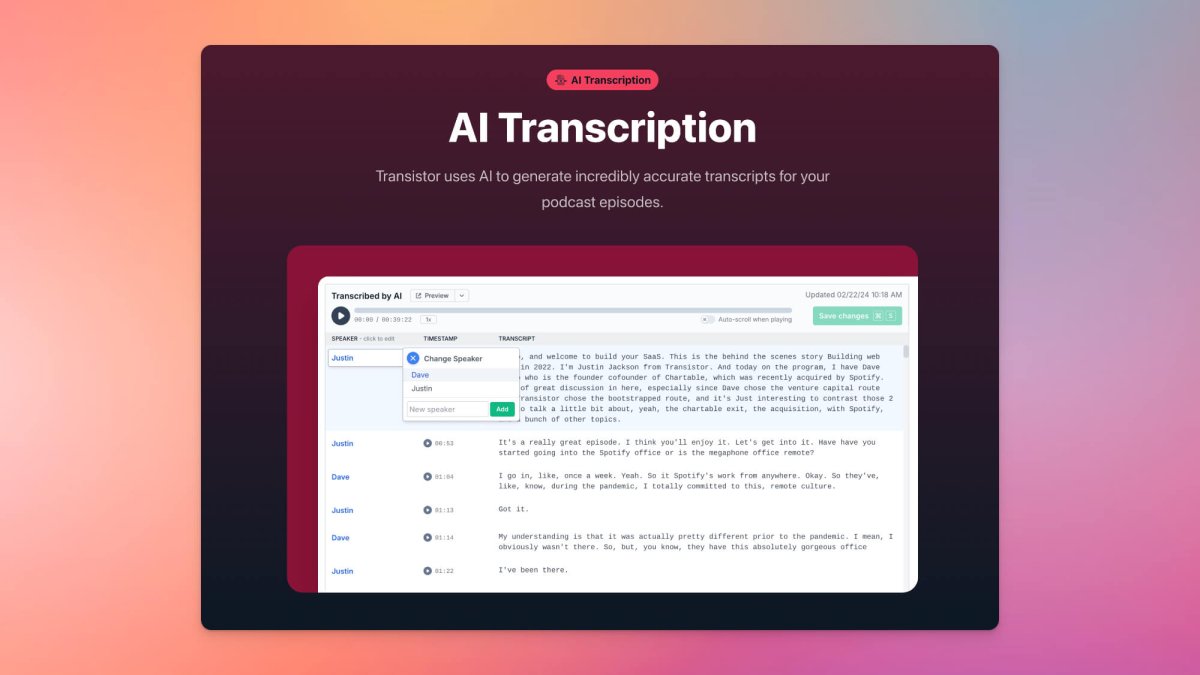
Speech-to-text transcripts for your podcast in just minutes. Easily make changes to your transcript and assign speakers using our transcript editor.

Remove vocals and instruments with high-quality AI voice splitter.
Run a free AEO + signal audit for your domain.
AI Answer Engine Optimization (AEO)
List once. Convert intent from live AI conversations without heavy integration.
Audio editing is the process of recording, manipulating, and enhancing sound recordings to achieve clear, professional audio quality. It involves techniques like noise reduction, equalization, compression, and mixing multiple audio tracks. For businesses, this results in more professional marketing videos, podcasts, and customer experiences with a coherent brand sound.
You establish your audio goals, required format, and desired style for your project, such as a commercial or podcast episode.
The provider cleans the recordings, removes background noise, balances levels, and adds effects or music as needed.
The edited audio undergoes a final review and is delivered in the required formats for your specific use case.
Enhances podcast clarity through noise reduction and leveling, leading to improved listener engagement and retention.
Ensures professional sound for marketing videos, boosting brand perception and conversion rates.
Optimizes audio clarity in educational content for a better learning experience and higher completion rates.
Creates clear, consistent voice prompts for customer service systems, improving the user experience.
Edits sound effects and UI feedback tones in digital products for a more intuitive user interface.
Bilarna evaluates audio editing providers using a proprietary 57-point AI Trust Score assessing expertise and reliability. Verification includes a detailed portfolio review, validation of client references, and monitoring of delivery performance. This ensures only qualified service providers are listed on the platform.
Audio editing costs vary based on project scope, length, and complexity. Simple podcast editing can start from a few hundred dollars, while intricate sound design for commercials requires a larger budget. A detailed project brief is essential for an accurate quote.
Turnaround time for one hour of raw audio depends on the required edits. Basic cleanup can be done within a day, while complex sound design with mixing may take several days. Clear deadlines should be agreed upon upfront.
A professional audio editor should be proficient with industry software like Pro Tools or Adobe Audition and have a strong understanding of acoustics. Key qualifications include a trained ear for detail, expertise in noise reduction, and a portfolio with relevant samples.
A common mistake is selecting a provider based solely on price without verifying technical skills and industry experience. Poor audio quality can undermine an entire project. Assessing references and specific expertise for your audio format is crucial.
The best output format depends on the use case. For maximum quality and further editing, a lossless format like WAV or AIFF is ideal. For web distribution like podcasts or videos, compressed formats like MP3 or AAC offer a good balance of quality and file size.
Yes, there are several additional online tools available for photo editing besides object removal. These include: 1. Photo Watermark Remover to precisely remove watermarks from images. 2. Photo Retoucher to enhance and retouch images effectively. 3. Background Remover and Background Changer to remove or customize photo backgrounds. 4. Image Converter tools to convert images between formats like GIF to JPG, PNG to JPG, and BMP to JPG. 5. Video tools such as Compress Video and Remove Watermark for video editing needs.
Customize audio explanations according to your knowledge level by using AI-powered tools that adjust content complexity. Follow these steps: 1. Select your preferred knowledge level ranging from beginner to expert before conversion. 2. The AI tailors explanations of formulas, tables, and figures to match your chosen level. 3. Upload your research paper or provide an arXiv link for processing. 4. Listen to the audio with explanations suited to your understanding. 5. Use chapter navigation to focus on sections that require more detailed or simplified explanations.
You cannot perform full video editing directly within the AI platform. 1. Use the AI platform to import and auto-prepare your raw footage. 2. The platform organizes clips, cuts silences, and creates rough story-driven cuts. 3. Once preparation is complete, export the project files. 4. Open these files in professional editing software like Adobe Premiere Pro, Final Cut, or DaVinci Resolve to continue detailed editing and finalization.
Yes, you can record system audio and use external devices with a Mac screen recorder. Follow these steps: 1. Open your Mac screen recording software. 2. Enable system audio recording in the settings to capture sounds from your computer, such as YouTube videos. 3. Connect external devices like microphones, cameras, or iPhones via USB or wireless connection. 4. Select the external device as the audio or video source in the app. 5. Start recording your screen along with the external audio and video inputs. 6. After recording, export your video with the combined audio and video sources.
Yes, you can use the app in multiple languages by following these steps: 1. Open the app and go to the settings menu. 2. Select your preferred language from over 20 available options. 3. Enjoy audio guides and tours in the chosen language for a personalized travel experience. This multilingual support makes the app suitable for travelers worldwide, ensuring accessibility and convenience.
No editing skills are needed to use the AI lyric video generator. Follow these steps: 1. Upload your song and lyrics files to the platform. 2. The AI automatically synchronizes the lyrics with the music and generates cinematic visuals. 3. Review the generated video to ensure it meets your expectations. 4. Download the finished lyric video directly without any manual editing required.
No video editing skills are needed to create ad videos with AI. Follow these steps: 1. Collect your product images and product details. 2. Upload them to the AI-powered video creation platform. 3. The AI automatically generates professional ad videos without manual editing. 4. Download and use the videos directly for your marketing efforts. This process eliminates the need for any video editing knowledge or software.
No, the video to documentation tool does not require audio narration to function. It uses AI to analyze the visual content of app walkthrough videos and generate structured documentation. Steps to use it without audio: 1. Upload the video without worrying about audio quality or presence. 2. The AI processes the visual elements and sequences to understand the workflow. 3. Documentation is created based solely on the visual cues and actions shown. 4. You can review and adjust the output as needed. 5. Export or share the documentation without any audio dependency.
AI assists in creating and editing PDF templates for API generation by automating code and design tasks. Follow these steps: 1. Describe your desired PDF layout, styling, and data fields in detail. 2. Attach reference files such as PDFs, images, or code snippets to guide the AI. 3. The AI generates a complete HTML/CSS template with dynamic variables and sample data. 4. Request changes to layout, fields, or styling; the AI updates the code accordingly. 5. Review changes side-by-side with previous versions and accept or reject them. This process eliminates manual coding, speeds up template creation, and ensures accuracy.
AI can assist in editing professional documents by enabling users to describe desired changes in natural language, which the AI then implements instantly while preserving the original formatting. This approach saves time on revisions, ensures consistency across documents, and allows users to focus on high-value tasks. Additionally, AI tools often provide features such as side-by-side comparison of edits for quality control, collaborative editing capabilities, and suggestions to refine writing style and tone, making document creation and revision more efficient and precise.