Step 1
Machine-Ready Briefs
AI translates unstructured needs into a technical, machine-ready project request.
We use cookies to improve your experience and analyze site traffic. You can accept all cookies or only essential ones.
 Bilarna
Stop browsing static lists. Tell Bilarna your specific needs. Our AI translates your words into a structured, machine-ready request and instantly routes it to verified AI-Powered 3D Animation experts for accurate quotes.
AI translates unstructured needs into a technical, machine-ready project request.
Compare providers using verified AI Trust Scores & structured capability data.
Skip the cold outreach. Request quotes, book demos, and negotiate directly in chat.
Filter results by specific constraints, budget limits, and integration requirements.
Eliminate risk with our 57-point AI safety check on every provider.
Verified companies you can talk to directly
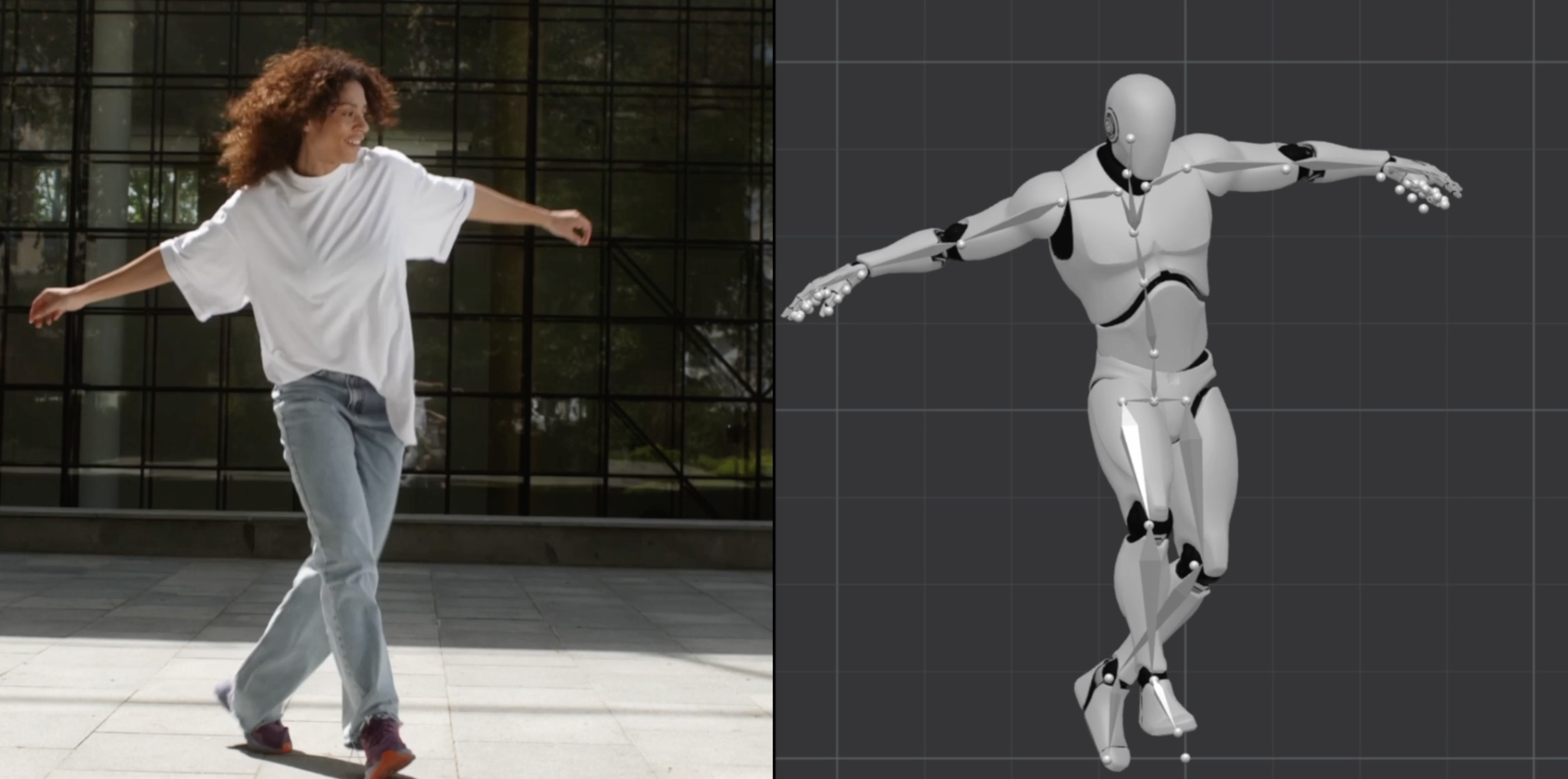
Plask offers AI motion capture from video, transforming your videos into stunning animations. Dive into our step-by-step guide and learn how to use our motion capture camera for the best results.
Run a free AEO + signal audit for your domain.
AI Answer Engine Optimization (AEO)
List once. Convert intent from live AI conversations without heavy integration.
AI-powered 3D animation is the application of machine learning and generative AI models to automate and enhance the creation of three-dimensional motion graphics. These technologies can generate realistic movements, textures, and environments, significantly reducing manual modeling and rigging time. The result is higher-quality animated content produced faster and at a lower cost for marketing, training, and product visualization.
The process begins by establishing the narrative, target style, and required 3D models, which serve as the foundational inputs for the AI systems.
Algorithms are used to automate tasks like character rigging, motion capture cleanup, environment generation, or applying realistic physics-based simulations.
The AI-optimized 3D scenes are rendered into final video sequences, with artists performing final quality checks and compositing for delivery.
AI rapidly generates complex character animations and dynamic environments, accelerating game development cycles and enabling more immersive player experiences.
Creates precise 3D animations of surgical procedures or molecular interactions for advanced medical training, patient education, and pharmaceutical research.
Automates the creation of photorealistic 3D walkthroughs and simulations from CAD models for client presentations, design validation, and virtual tours.
Generates high-fidelity 3D product animations and configurators from images, allowing customers to interact with products virtually before purchase.
Simulates vehicle aerodynamics, crash tests, and complex assembly line processes in 3D for design optimization, safety testing, and technical documentation.
Bilarna evaluates every AI-powered 3D animation provider using a proprietary 57-point AI Trust Score. This score rigorously assesses technical expertise through portfolio reviews, verifies client satisfaction with references, and checks compliance with data security and industry standards. Bilarna's continuous monitoring ensures you only connect with partners who have a proven delivery track record.
Costs vary widely based on project complexity, style, and length, ranging from a few thousand dollars for a simple product animation to six figures for cinematic-quality sequences. Key cost drivers include the level of AI automation used, custom modeling needs, and rendering resolution requirements.
The primary advantage is a dramatic reduction in production time and cost for repetitive or data-intensive tasks, such as lip-syncing, crowd simulation, or environment detailing. This allows studios to allocate human talent to creative direction and high-value artistic decisions, boosting overall output and innovation.
A professional 60-second animation can be completed in weeks instead of months, depending on assets. AI accelerates pre-production (concept art, storyboarding) and production (animation, simulation) phases. The most time-intensive phase remains rendering, though AI-optimized render farms are improving this.
Prioritize providers with a strong portfolio in your specific industry and style, proven expertise in the AI tools they employ (e.g., NVIDIA Omniverse, Unreal Engine MetaHuman), and clear data security protocols. Assess their ability to integrate AI into a cohesive pipeline without sacrificing final creative quality.
Common pitfalls include over-reliance on AI leading to generic or uncanny results, underestimating the need for high-quality input data and direction, and neglecting the importance of skilled artists to guide and refine the AI's output. A successful project balances automation with expert creative oversight.
Yes, the AI-powered teacher tools are free and include the following features: 1. Worksheet Generator to create custom worksheets quickly. 2. Lesson Plan Generator for comprehensive, standards-aligned lesson plans. 3. Report Card Comments generator for professional, personalized feedback. 4. Coloring Page Generator to turn ideas into printable coloring pages. 5. All tools save your work automatically to a cloud library accessible from any device. 6. Tools are private, secure, and supported with fast in-app chat assistance.
Yes, many AI animation tools allow users to personalize and edit animations after the initial generation. This capability significantly impacts creative workflows by providing flexibility and control over the final output. Users can start with an AI-generated base animation and then customize elements such as timing, colors, graphics, and text to better align with their brand identity and creative vision. This reduces the need to create animations from scratch while still enabling unique and tailored results. The ability to refine AI-generated content accelerates the creative process, saves time, and allows creators to focus more on innovation and storytelling rather than repetitive technical tasks.
Yes, many AI-powered browsers built on Chromium technology are compatible with Chrome extensions, allowing users to continue using their favorite add-ons without interruption. These browsers often support seamless import of existing browser data such as bookmarks, passwords, and extensions from Chrome, making the transition smooth and convenient. This compatibility ensures that users do not lose their personalized settings or tools when switching to an AI-enabled browser. By combining AI capabilities with familiar browser features, users can enhance productivity while maintaining their preferred browsing environment.
Yes, an AI-powered authoring platform can handle complex academic content effectively. To do so: 1. Use LaTeX or MathML support to create, edit, and validate complex STEM equations accurately. 2. Integrate with reference databases such as CrossRef, PubMed, and ORCID for real-time reference verification and linking. 3. Apply automatic formatting and style consistency to references and citations. 4. Edit text, tables, and figures with AI assistance to maintain accuracy. 5. Manage author queries and communication within the platform to resolve content issues. 6. Export structured, publication-ready outputs in XML and PDF formats. This ensures precise handling of technical academic content, improving quality and efficiency in scholarly publishing.
Yes, you can use an AI-powered platform alongside your existing email service provider (ESP). 1. Write and design emails using the AI platform. 2. Export or copy-paste the content to your current ESP for sending. 3. Alternatively, manage contacts, sending, and automation directly within the AI platform for a streamlined workflow.
No, you do not need an API key to use an AI-powered WordPress page builder. Follow these steps: 1. Install the AI page builder plugin directly from the WordPress repository. 2. Activate the plugin without any additional setup or API key configuration. 3. Start describing your page requirements and generate content immediately. The AI access is built-in, so there is no need to create external accounts or manage API keys, simplifying the setup process and allowing you to focus on building your site.
No coding or advanced data skills are required to use AI-powered customer reporting tools. Follow these steps to use them effectively: 1. Import or connect your raw data sources to the platform. 2. Let the AI agents automatically analyze and combine your data. 3. Use intuitive interfaces to customize and generate reports. 4. Access embed-ready reports for easy sharing or integration. 5. Make adjustments as needed without writing any code or performing complex data operations.
No coding skills are required to create a web app using an AI-powered builder. These platforms allow you to describe your app idea in plain language, and the AI will automatically build the application for you. This eliminates the need to understand APIs, programming languages, or technical setups. While you can customize the generated code later if you want, the initial creation process is designed to be accessible to users without any coding experience. This approach makes web app development faster and more inclusive for people with diverse skill levels.
No installation is typically required to use AI-powered video script optimization tools. Follow these steps: 1. Access the tool via a web browser on any device. 2. Sign up or log in to the platform if necessary. 3. Upload or input your video script directly on the website. 4. Use the tool's features online without downloading any software, ensuring quick and easy access.
No, you do not need to know SQL to use an AI-powered data analytics platform. These platforms often feature natural language processing capabilities that allow you to ask questions in plain English. The AI then translates your questions into syntactically correct SQL queries and generates the corresponding charts or tables. This makes data exploration accessible to users without technical SQL skills, enabling faster decision-making and a more data-driven culture within your organization.